- Home Page /
- Electronics /
- Computer Accessories /
- Computer Accessories & Peripherals /
- Computer Cable Adapters /
- 2230 NGFF A+E-Key Male to NVME M-Key Female E...
0 ratings

Item #:
106001454
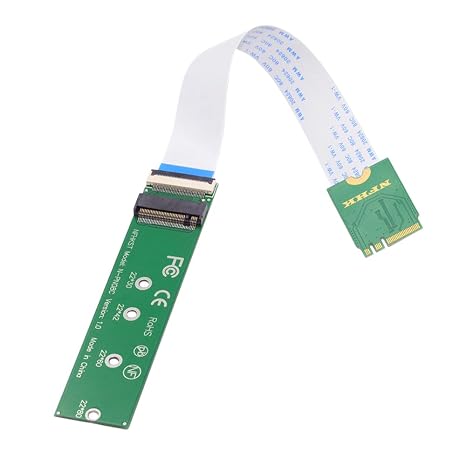
2230 NGFF A+E-Key Male to NVME M-Key Female Extension Cable for Laptop Mainboard SSD 2280
Item #:
106001454
NAD 550
Price Details
Excluding Shipping & Custom charges ( Shipping and custom charges will be calculated on checkout )
*All items will import from US
0 ratings
Write a review
In stock
 Imported from USA store
QTY:
Order now and get it around Thursday, June 25
Secured transaction
Ubuy works hard to protect your security and privacy. Our advanced payment security system ensures confidentiality by encrypting your information during transmission using AES (Advanced Encryption Standards) and SSL (Secure Socket Layer) protocols. Your payment details are 100% secure as we do not share your payment details with third party sellers.
Our Top Logistics Partners


Convert the PCI-E interface of the motherboard to M.2 KEY A-E or KEY E interface. No additional power required.

Fast
Shipping

Free
Return*

Secure Packaging

100% Original Products

PCI DSS Compliance

ISO 27001 Certified


Note: Step Down Voltage Transformer required for using electronics products of US store (110-120). Recommended power converters Buy Now.


What Stands Out
Next-Gen Connectivity
Supports WiFi 6 and WiFi 7 standards, providing ultra-fast internet speeds and improved bandwidth efficiency, ensuring seamless streaming and gaming experiences.
Easy Installation
Plug-and-play design allows for quick installation on desktops, making it accessible even for users with minimal technical skills, enhancing user convenience.
Bluetooth Integration
Equipped with Bluetooth capabilities, enabling users to connect a range of wireless devices effortlessly, thus expanding functionality beyond traditional internet access.
Product Details
| Item Weight | 0.5 lbs (230 grams) |
Who Should Buy?

-
Gaming Enthusiasts
Ideal for gamers seeking high-speed wireless connectivity for low latency and seamless online gaming experiences.
-
Tech Upgraders
Perfect for users wanting to upgrade older systems to support the latest WiFi technologies and improved performance.
-
Home Office Users
Beneficial for remote workers relying on stable and fast internet connections for video conferencing and productivity.

-
Casual Internet Users
Not necessary for users who require basic internet browsing without the need for high-speed wireless connections.
-
Older Systems
May not be suitable for very old computers lacking PCI-E slots or compatibility with newer technologies.
-
Non-technical Users
Could be challenging for users unfamiliar with installing hardware or configuring network settings effectively.
Product Description
2230 NGFF A+E-Key Male to NVME M-Key Female Extension Cable for Laptop Mainboard SSD 2280
Have any Query? Chat with us
Customer Questions & Answers
-
Question:
What is the NFHK Wireless NGFF A/E-Key WiFi Card to PCI-E Express 1x Adapter used for?
Answer: The NFHK Wireless NGFF A/E-Key WiFi Card to PCI-E Express 1x Adapter is designed to enhance the wireless connectivity of your PC or laptop by allowing you to install a WiFi card for WLAN WiFi6 and WiFi7 standards. This adapter is particularly useful for users who want to upgrade their system’s networking capabilities to achieve faster internet speeds, reduced latency, and enhanced signal strength. For example, gamers can benefit from reduced lag during online play, while professionals can experience seamless streaming and conferencing. -
Question:
Is the NFHK Wireless Adapter compatible with all motherboards?
Answer: The NFHK Wireless Adapter is compatible with motherboards that have an available PCI-E Express 1x slot, which is common in many modern desktops. It specifically supports NGFF A/E-Key WiFi cards designed for WLAN WiFi6 and WiFi7 technologies. Before purchasing, it's advisable to check your motherboard specifications to ensure compatibility. This adapter is an excellent choice for tech enthusiasts looking to upgrade older systems to leverage the newest wireless technologies. -
Question:
Does the NFHK adapter support Bluetooth?
Answer: Yes, the NFHK Wireless NGFF A/E-Key WiFi Adapter supports Bluetooth functionality, but this is contingent upon the specific WiFi card you install. Many modern cards that fit this adapter include integrated Bluetooth capabilities, enabling users to connect peripheral devices like headsets or keyboards wirelessly. Users looking to expand their device connectivity will find this feature particularly beneficial, especially in setups designed for multimedia tasks or gaming. -
Question:
Can I use the NFHK adapter in a laptop?
Answer: The NFHK Wireless NGFF A/E-Key WiFi Adapter is primarily designed for desktop installations due to its PCI-E Express interface. However, some laptops may feature PCI-E slots that are accessible, allowing for the use of this adapter if the laptop’s design permits. It is ideal for desktop users looking to boost their wireless performance, and while not typically suited for laptops, some adventurous tinkerers may find a way to use it in specific models. -
Question:
What benefits does WiFi6/WiFi7 provide over previous standards?
Answer: WiFi6 and WiFi7 offer substantial enhancements over earlier WiFi versions such as WiFi5. These benefits include increased speeds, improved capacity for multiple devices, and lower latency, making your internet experience smoother. WiFi6 utilizes technologies like OFDMA and MU-MIMO to allow simultaneous connections, while WiFi7 anticipates even faster throughput and supports higher bandwidth. This is especially advantageous in environments like smart homes or crowded networks where several devices require stable connectivity. -
Question:
How do I install the NFHK WiFi Adapter?
Answer: Installing the NFHK WiFi Adapter involves opening your desktop case, locating an available PCI-E Express 1x slot, and carefully inserting the adapter until it clicks into place. Once installed, you will need to connect the appropriate antennas and install the necessary drivers for your WiFi card. It is a straightforward process for anyone comfortable with basic computer hardware, enhancing your wireless capabilities significantly once completed. -
Question:
What devices can benefit from using the NFHK Wireless Adapter?
Answer: Devices that can benefit from the NFHK Wireless Adapter are primarily desktop computers that require enhanced WiFi connectivity. Gamers, streaming enthusiasts, and home office setups are particularly well-suited for this adapter, as it allows for high-speed internet access. Additionally, users looking to upgrade existing systems to WiFi6 or WiFi7 standards will appreciate the added performance, ensuring that their devices remain compatible with the latest networking technologies. -
Question:
Is there a limit to the number of devices I can connect?
Answer: The NFHK Wireless NGFF A/E-Key WiFi Adapter itself does not impose a limit on the number of devices connected; rather, the capacity depends on the installed WiFi card and your router's specifications. WiFi6 and WiFi7 cards typically allow for better multitasking with multiple devices, reducing congestion on your network. This is essential for households with many smart devices, as it enables a smoother experience across all connected devices without significant drops in performance. -
Question:
What types of applications can I run with this adapter?
Answer: With the NFHK Wireless Adapter installed, users can run various applications that require robust internet connectivity. This includes high-definition video streaming, online gaming, video conferencing, and large file downloads or uploads. The enhanced speed and connectivity provided by WiFi6 and WiFi7 standards make it suitable for bandwidth-intensive applications, ensuring a reliable performance, making it a great choice for both casual and professional users. -
Question:
Where can I buy the NFHK Wireless NGFF A/E-Key WiFi Card to PCI-E Express 1x Adapter?
Answer: You can purchase the NFHK Wireless NGFF A/E-Key WiFi Card to PCI-E Express 1x Adapter from Ubuy in Namibia. Ubuy offers a convenient platform for acquiring this adapter, making it simple to upgrade your wireless capabilities with just a few clicks. Choose Ubuy for a smooth shopping experience and quick access to high-quality tech products.
NFHK Computer Cable Adapters Editorial Review
### Editorial Review The NFHK Wireless NGFF A/E-Key WiFi Card to PCI-E Express 1x Adapter has garnered a positive reception among users, particularly those looking to upgrade older systems like the HP Stream 14. Customers have praised its effectiveness in converting a Wi-Fi adapter to be utilized as an additional drive, extending the life and performance of their devices. Reviewers note that it allows for seamless installation of Windows 10 and supports system updates without a significant drop in performance, making it a budget-friendly option for anyone wanting to breathe new life into aging hardware. However, while the product serves its primary function well, some users identified potential issues such as the cable's shorter length compared to similar products on the market, which could limit placement options. Additionally, those who installed the adapter with Linux on an NVME drive experienced PCIe errors; however, they found that by shielding the flex cable, they were able to resolve these issues effectively, leading to stable performance. Users have also highlighted the convenience of fitting SSDs with heatsinks that otherwise would not align with motherboard mounts, making this adapter a versatile addition to their setups. Overall, the NFHK Wireless NGFF A/E-Key WiFi Card Adapter effectively fulfills its purpose and provides good value, particularly for those willing to engage in some additional setup and troubleshooting to achieve robust performance. ### Pros and Cons **
Customer Reviews & Ratings
1 customers ratings
-
5 Star
100%
-
4 Star
0%
-
3 Star
0%
-
2 Star
0%
-
1 Star
0%
Review this product
Share your thoughts with other customers
Pros
- Cost-effective solution for upgrading older hardware.
- Allows installation of Windows 10 and supports system updates without performance drops.
- Versatile; fits SSDs with heatsinks which may not align with motherboard mounts.
- User-friendly for those familiar with basic installation processes.
Cons
- Cable length is shorter than some alternative products.
Product Price History
Important information
- Limitations : For products shipped internationally, please note that any manufacturer warranty may not be valid; manufacturer service options may not be available; product manuals, instructions, and safety warnings may not be in destination country languages; the products (and accompanying materials) may not be designed in accordance with destination country standards, specifications, and labeling requirements; and the products may not conform to destination country voltage and other electrical standards (requiring use of an adapter or converter if appropriate). The recipient is responsible for assuring that the product can be lawfully imported to the destination country. When ordering from Ubuy or its affiliates, the recipient is the importer of record and must comply with all laws and regulations of the destination country.
- Not all the products listed on Ubuy are for sale, as Ubuy is a global search engine. Products are subject to export/trade regulations.
NAD 550
Order now and get it around Thursday, June 25
This item is not restrict in my country.(Please click on above link if this item is not restrict in your country, So our team will review and allow.)
QTY:
Secured transaction
Ubuy works hard to protect your security and privacy. Our advanced payment security system ensures confidentiality by encrypting your information during transmission using AES (Advanced Encryption Standards) and SSL (Secure Socket Layer) protocols. Your payment details are 100% secure as we do not share your payment details with third party sellers.
Our Top Logistics Partners
Fastest cross-border delivery
Features & Benefits
- Easily convert PCI-E interface to M.2 KEY A-E or E.
- Compatible with PCI-E 1X, 4X, 8X, and 16X connectors.
- No external power necessary for seamless operation.
- Compact design ensures stable performance.
- Supports a range of WiFi modules and desktop PCs.
- Ready to use with pre-installed regular-profile bracket.