0 ratings

Item #:
86327125
Windows Shortcut Sticker - Keyboard Shortcut Vinyl Sticker, Laptop Keyboard Shortcuts Stickers, for Any PC Laptop or Desktop SM Black1-Pack
Item #:
86327125
NAD 234
Price Details
Excluding Shipping & Custom charges ( Shipping and custom charges will be calculated on checkout )
*All items will import from US
0 ratings
Write a review
In stock
 Imported from USA store
QTY:
Order now and get it around Friday, July 24
Secured transaction
Ubuy works hard to protect your security and privacy. Our advanced payment security system ensures confidentiality by encrypting your information during transmission using AES (Advanced Encryption Standards) and SSL (Secure Socket Layer) protocols. Your payment details are 100% secure as we do not share your payment details with third party sellers.
Our Top Logistics Partners


Master basic shortcuts at any time to improve your productivity and multiply your workflow.

Fast
Shipping

Free
Return*

Secure Packaging

100% Original Products

PCI DSS Compliance

ISO 27001 Certified


Note: Step Down Voltage Transformer required for using electronics products of US store (110-120). Recommended power converters Buy Now.


What Stands Out
Versatile Design
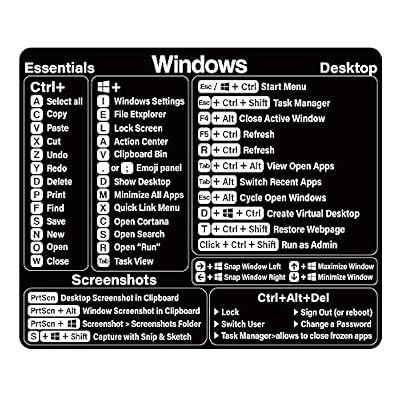
Designed for any PC laptop or desktop, this sticker enhances usability, making it ideal for users of all levels to access shortcuts quickly, improving workflow efficiency.
Durable Material
Crafted from high-quality vinyl, this sticker withstands daily wear and tear, ensuring lasting visibility and effectiveness, ideal for long-term use in home or office settings.
Easy Application
Self-adhesive and removable, these stickers allow for straightforward application and repositioning without leaving residue, catering to users looking for convenience and customization options.
Product Details
| Item Weight | 0.1 lbs (50 grams) |
Who Should Buy?

-
Students
Ideal for students learning software programs, these stickers can help improve workflow and enhance productivity during studies.
-
Beginner Users
Perfect for novice users, this product assists in understanding keyboard shortcuts, facilitating smoother navigation across software.
-
Remote Workers
Remote workers can benefit from quick access to shortcuts, streamlining tasks and improving efficiency in their daily workflows.

-
Advanced Users
Experienced users may not need reminders for shortcuts and could find the stickers redundant or unnecessary.
-
Minimalists
Individuals who prefer a clean aesthetic may find the presence of stickers on their keyboard visually unappealing.
-
Mac Users
This product is tailored for Windows shortcuts and will not be useful for users operating on Mac systems.
Product Description
Windows Shortcut Sticker - Keyboard Shortcut Vinyl Sticker, Laptop Keyboard Shortcuts Stickers, for Any PC Laptop or Desktop SM Black1-Pack
Have any Query? Chat with us
Customer Questions & Answers
-
Question:
What is the Windows Shortcut Sticker used for?
Answer: The Windows Shortcut Sticker serves as a visual guide to enhance your productivity by displaying essential keyboard shortcuts for various tasks. This is especially helpful for beginners or users transitioning to new software, minimizing the time spent searching for commands. For instance, graphic designers often find these shortcuts invaluable when navigating complex design software, allowing for a smoother workflow. -
Question:
Can I use the Windows Shortcut Sticker on any laptop or desktop?
Answer: Yes, the Windows Shortcut Sticker is designed to be compatible with any PC laptop or desktop. Its universal size and design ensure it fits comfortably on most keyboards without obstructing other keys. This makes it ideal for anyone who wants to improve their keyboarding efficiency regardless of their device. Whether you’re a student, a gamer, or a professional, this sticker will enhance your user experience. -
Question:
How do I apply the Windows Shortcut Sticker to my keyboard?
Answer: Applying the Windows Shortcut Sticker is straightforward. Start by cleaning your keyboard surface to ensure there’s no dust or grease. Then, gently peel the sticker from its backing and align it over the keys. Once positioned correctly, press down firmly, smoothing out any bubbles. This method ensures a clean look and optimal adherence, making it an ideal choice for maintaining keyboard aesthetics while boosting functionality. -
Question:
Are the shortcuts on the sticker suitable for all versions of Windows?
Answer: The shortcuts on the sticker primarily reflect the most commonly used commands across various versions of Windows, including Windows 10 and 11. However, while most shortcuts are standardized, some may slightly differ depending on specific software programs. This versatility makes it a useful tool for users who frequently switch between different Windows environments or applications, enhancing their overall experience. -
Question:
Is the sticker durable and resistant to wear and tear?
Answer: Yes, the Windows Shortcut Sticker is made from high-quality vinyl that is designed to be durable and resistant to daily wear and tear. This material ensures that the stickers won’t fade quickly or peel off even with regular use. It's ideal for individuals who frequently type or game, where rough usage might occur, ensuring your shortcuts remain visible and effective over time. -
Question:
How can the sticker help improve my typing speed?
Answer: By providing quick access to essential keyboard shortcuts, the Windows Shortcut Sticker can significantly improve your typing speed. Users who are familiar with shortcuts perform tasks like copy-pasting or formatting much quicker than those who rely solely on mouse navigation. For professionals in fast-paced environments, mastering these shortcuts can lead to increased productivity and smoother workflow. -
Question:
Can I remove the sticker without damaging my keyboard?
Answer: Yes, the Windows Shortcut Sticker can be removed without causing damage to your keyboard. Designed to peel away cleanly, it doesn’t leave any sticky residue behind. This feature is especially beneficial if you plan to change your keyboard or do not want long-term commitment. Users often appreciate the ease of switching or updating their stickers as their needs evolve. -
Question:
What color options are available for the Windows Shortcut Sticker?
Answer: The Windows Shortcut Sticker is offered in various color options, including black, which is neutral and blends seamlessly with most keyboard designs. While black provides a sleek look, other colors may be available to suit personal styles. Choosing a color that contrasts well with your keyboard will enhance visibility, so users can quickly locate shortcuts during high-paced tasks. -
Question:
Where can I buy the Windows Shortcut Sticker?
Answer: You can purchase the Windows Shortcut Sticker on Ubuy, an established e-commerce platform that provides a diverse range of products. Ubuy offers a user-friendly shopping experience and reliable customer service, making it easy to find the sticker you need right from the comfort of your home. They also cater to various countries, ensuring accessibility for customers around the globe. -
Question:
Are there any tips for maintaining the sticker once applied?
Answer: To maintain the Windows Shortcut Sticker, keep your keyboard clean and avoid harsh cleaners that could degrade the vinyl material. Regular gentle wiping with a damp cloth will help keep the sticker looking fresh. Additionally, refrain from heavy scrubbing or using solvents that could peel the sticker or erase the printed shortcuts. Proper care will ensure your shortcuts remain clear and highly functional.
SWITHOM Decals Editorial Review
No editorial reviews found
Customer Reviews & Ratings
1 customers ratings
-
5 Star
100%
-
4 Star
0%
-
3 Star
0%
-
2 Star
0%
-
1 Star
0%
Review this product
Share your thoughts with other customers
Platform Trust & Buyer Confidence

MT
Mohd
Verified buyer
“The product received very good packaging & safe…Thank You”
16 June 2026 · via Trustpilot
SJ
Shawati
Verified buyer
“Accurate delivery timing given”
16 June 2026 · via Trustpilot
YB
Youcef
Verified buyer
“Not madly expensive like I thought, and much quicker than promised.”
15 June 2026 · via Trustpilot
LM
Leila
Verified buyer
“Never dealt with Ubuy before, but everything worked out great. Seamless cross border purchasing and shipping. Thanks!”
6/7/2026 · via Trustpilot
KA
Kwame
Verified buyer
“The process was smooth, with clear communication and timelines. This was my 1st purchase and I am really impressed. I will definitely be coming back.”
12 June 2026 · via Trustpilot
Secure Checkout
Global Delivery
Easy Returns
Genuine Products
Product Price History
Important information
- Limitations : For products shipped internationally, please note that any manufacturer warranty may not be valid; manufacturer service options may not be available; product manuals, instructions, and safety warnings may not be in destination country languages; the products (and accompanying materials) may not be designed in accordance with destination country standards, specifications, and labeling requirements; and the products may not conform to destination country voltage and other electrical standards (requiring use of an adapter or converter if appropriate). The recipient is responsible for assuring that the product can be lawfully imported to the destination country. When ordering from Ubuy or its affiliates, the recipient is the importer of record and must comply with all laws and regulations of the destination country.
- Not all the products listed on Ubuy are for sale, as Ubuy is a global search engine. Products are subject to export/trade regulations.
NAD 234
Order now and get it around Friday, July 24
This item is not restrict in my country.(Please click on above link if this item is not restrict in your country, So our team will review and allow.)
QTY:
Secured transaction
PCI DSS compliant and ISO 27001:2022 certified, with encrypted payments and full buyer protection on every order.
Our Top Logistics Partners
Fastest cross-border delivery
Features & Benefits
- Made of high-quality vinyl for durability.
- Scratch-resistant and highly water-resistant.
- No residual adhesive for easy application.
- Includes shortcuts for all Windows operating systems.
- Compatible with any brand laptop or desktop running Windows 10 or 11.
- Perfect for beginners and seasoned professionals alike.
Ubuy Assurance
Experience worry-free shopping with 100% original products, PCI DSS-compliant payment security, ISO 27001-certified data protection, the fastest cross-border delivery, free returns *, and secure packaging on every order.