
0 ratings
USB C Docking Station Dual Monitor, 15 in 1 USB C Dock Dual HDMI with 65W Power Supply, VGA, 7 USB, SDTF, Gigabit Ethernet, Universal Laptop Docking Station for MacBook ProAirDellHPSurfaceLenovo
15 in 1 USB C Laptop Dock to connect multiple devices and extend dual or triple monitors with a stable and faster network connection.
USB C Docking Station Dual Monitor, 15 in 1 USB C Dock Dual HDMI with 65W Power Supply, VGA, 7 USB, SDTF, Gigabit Ethernet, Universal Laptop Docking Station for MacBook ProAirDellHPSurfaceLenovo
Item #: 41977597

USB C Docking Station Dual Monitor, 15 in 1 USB C Dock Dual HDMI with 65W Power Supply, VGA, 7 USB, SDTF, Gigabit Ethernet, Universal Laptop Docking

Item #: 41977597

NAD 6429201

Price Details

Excluding Shipping & Custom charges ( Shipping and custom charges will be calculated on checkout )

*All items will import from US

0 ratings Write a review
Out of stock
us Imported from USA store
Our Top Logistics Partners
  • fedex
  • dhl
15 in 1 USB C Laptop Dock to connect multiple devices and extend dual or triple monitors with a stable and faster network connection.
U-Care Warranty:
None
Select a Plan
fast shipping

Fast
Shipping

free return

Free
Return*

secure packaging

Secure Packaging

100% original products

100% Original Products

pci-dss

PCI DSS Compliance

iso certified

ISO 27001 Certified


paypal payment
visa payment
mastercard payment
Note: Step Down Voltage Transformer required for using electronics products of US store (110-120). Recommended power converters Buy Now.

What Stands Out

Dual Monitor Support
Easily connect dual monitors with HDMI and VGA ports, enhancing productivity for multitaskers and professionals needing extensive display setups.
Wide Compatibility
Designed for M1 MacBook Pro/Air and USB-C Windows laptops, ensuring versatility and ease of connection across different devices for users.
Multiple Ports
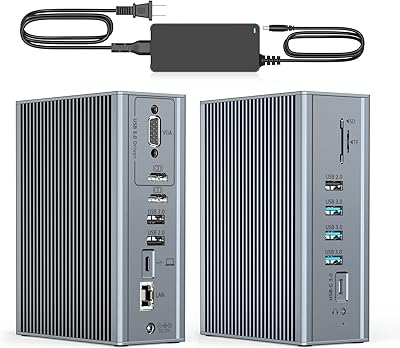
Offers 16 ports including USB, audio, and SD/TF slots, providing comprehensive connectivity to all peripherals, making it ideal for users with diverse needs.

Product Details

Shop USB C Docking Station Dual Monitor, 15 in 1 USB C Dock Dual HDMI with 65W Power Supply, VGA, 7 USB, SDTF, Gigabit Ethernet, Universal Laptop Docking Station for MacBook ProAirDellHPSurfaceLenovo online at a best price in Namibia. B09DFXCKK4
Product Dimensions (L x W x H)5.6 x 4.1 x 2 inches (14.2 x 10.4 x 5.1 cm)
Item Weight1.7 pounds (770 grams)
Item model numberCW2003250
Date First AvailableJune 8, 2021
ManufacturerShenzhen Cenwell Technology Co. Ltd. MOKE INDUSTRIAL LIMITED
BrandTobenone
ColorGrey UDS16D
Hardware Interface3.5mm Audio, Ethernet, HDMI, USB 2.0, USB 3.0, USB Type C, VGA
Compatible DevicesMacBook Pro(With Intel/M1/M2/M1 Pro/M1 Max chip), MacBook Air(With Intel/M1/M2/M1 Pro/M1 Max chip), USB-C Microsoft Surface line w/ USB-C: Pro 7 / Go & Go 2 / Book 2 & 3 / Laptop 2 & 3, HP Spectre x360 series, Dell XPS 13 & XPS 15 (9300 9310 9350 9360 9370 9380 9550 9560 9570 7390 +more) / Latitude (5580 7280 7400 7490 +more), Lenovo ThinkPad T series (T470, T480, T490), Surface Pro 7, etc. See more
Total USB Ports7
Number of Ports15
Item Weight1.7 Pounds (770 grams)
Total HDMI Ports2
Wattage65 watts

Who Should Buy?

Suitable For
  • Remote Workers

    This docking station provides multiple ports, allowing easy connection to peripherals, enhancing productivity for remote professionals.

  • Content Creators

    Ideal for video editing and graphic design, supporting dual monitors and various connectivity options for seamless workflows.

  • Students

    Students can benefit from the docking station to connect multiple devices, enhancing their laptop's functionality in educational settings.

Not Suitable For
  • Casual Users

    Users who only occasionally need extra ports may not find this extensive docking station necessary for their needs.

  • Gaming Enthusiasts

    While functional, this docking station may not support high-performance gaming setups or specialized peripherals required by gamers.

  • Older Laptops

    The docking station primarily targets USB-C compatible devices, making it unsuitable for older laptops without USB-C ports.

Product Description

USB C Docking Station Dual Monitor, 15 in 1 USB C Dock Dual HDMI with 65W Power Supply, VGA, 7 USB, SDTF, Gigabit Ethernet, Universal Laptop Docking Station for MacBook ProAirDellHPSurfaceLenovo

Have any Query? Chat with us

Customer Questions & Answers

  • Question: What features does the USB C Laptop Docking Station offer?

    Answer: The USB C Laptop Docking Station features a remarkable set of 16 ports, including dual HDMI outputs, VGA, USB-C, six USB ports, a 3.5mm audio jack, SD and TF card slots, and an RJ45 Ethernet port. This extensive range allows users to connect multiple devices simultaneously, enhancing productivity. For instance, you can connect dual monitors for a more immersive workspace, transfer files quickly through USB ports, and enjoy reliable internet access with the RJ45 port. It's designed for seamless integration, particularly with M1 chip devices.
  • Question: How do I set up the USB C Docking Station with my laptop?

    Answer: Setting up the USB C Docking Station is simple: connect it to your laptop using the USB C port and then plug in your peripherals. The station supports plug-and-play functionality, meaning it often doesn’t require additional software. Once connected, you can hook up monitors, external drives, and other devices directly to the dock. For scenario references, employees can easily transition from home office setups to presentations in the conference room by just unplugging and re-plugging their laptops into the dock.
  • Question: Is the USB C Laptop Docking Station compatible with all laptops?

    Answer: While the USB C Laptop Docking Station is designed to be widely compatible, it works best with laptops that support USB-C with DisplayPort Alt Mode or Thunderbolt 3. This includes many MacBook models, especially those with M1 chips. However, laptops without these features may not utilize all functionalities of the dock. For better clarity, if you are using a non-compatible laptop, you might still connect via USB but may miss out on video output capabilities that the dock offers with fully compatible devices.
  • Question: Can I use the docking station to connect dual monitors?

    Answer: Yes, the USB C Laptop Docking Station supports dual monitor setups using the two HDMI outputs. This feature is particularly beneficial for multitasking, allowing you to have different applications open across two screens, improving workflow efficiency. For instance, you may choose to have a video presentation on one screen while working on documents or conducting research on another. Ensure that your laptop supports dual display via USB-C to take full advantage of this feature.
  • Question: What type of devices can I connect to the docking station?

    Answer: You can connect a wide array of devices to the USB C Laptop Docking Station, such as external monitors, USB storage devices, printers, and even audio devices. With six USB ports, you can charge devices while connecting peripherals like keyboards and mice. For example, gamers can plug in their gaming accessories while designers can connect high-resolution monitors. The comprehensive compatibility makes it a versatile hub for any workspace, whether at home or in an office.
  • Question: Does the docking station provide power delivery to my laptop?

    Answer: Yes, the USB C Laptop Docking Station typically supports power delivery, allowing you to power your laptop while connected. This feature is essential as it means you don't need a separate charger plugged in, minimizing clutter. For users on the go, this means a single USB-C connection can handle video output, data transfer, and power, improving efficiency during travels or meetings. Just make sure your USB C charging source passes sufficient wattage to meet your laptop's requirements.
  • Question: Can I use the audio output feature with this docking station?

    Answer: Absolutely! The USB C Laptop Docking Station includes a 3.5mm audio jack that allows you to connect headphones or external speakers. This makes it convenient for enjoying high-quality sound for entertainment or video calls without disturbing others in the room. For remote workers or students engaging in online classes, this feature ensures clear audio during discussions or presentations, enhancing the overall experience.
  • Question: Does the docking station support SD and TF card reading?

    Answer: Yes, the USB C Laptop Docking Station is equipped with SD and TF card slots, enabling quick access to files from your cameras or mobile devices. This is particularly useful for photographers and content creators who need to transfer images or videos frequently. By simply inserting the card into the dock, you can smoothly manage your multimedia files without needing alternative readers, streamlining your workflow.
  • Question: What is the ethernet capability of this docking station?

    Answer: The USB C Laptop Docking Station features an RJ45 Ethernet port, which allows for a wired internet connection. This is beneficial for environments where stable and fast internet is a necessity, such as during video conferencing sessions or large file uploads. In instances where Wi-Fi is unreliable, using the dock’s ethernet connection ensures a consistent and strong internet connection, improving overall productivity.
  • Question: Where can I buy the USB C Laptop Docking Station Dual Monitor?

    Answer: You can purchase the USB C Laptop Docking Station Dual Monitor from Ubuy. Ubuy provides a convenient platform for various electronic products, making it straightforward to find the docking station and place an order. By shopping at Ubuy, you can enjoy a seamless shopping experience and potentially discover other related accessories to enhance your setup.

Tobenone Docking Stations CW2003250 Editorial Review

The Tobenone USB-C Docking Station has been well received overall. Buyers appreciated the sturdy build and the design of the dock which looks premium. It works well with laptops such as Dell Precision 5540, Macbook Air 2020, and HP Pavilion with Thunderbolt 3 ports. It can also support dual monitors and even up to 4 external monitors through the laptop's HDMI slot, with some reports of minor video lagging when watching videos on YouTube. However, it is not compatible with Microsoft Surface Pro 6 or Surface Pro 8, or Galaxy Tab S8 Ultra. Drivers need to be installed before use, and customer support is responsive and helpful. Some buyers had issues with the dock randomly disconnecting the monitors, but this was found to be an issue with the unit itself, and replacements were issued promptly. However, some buyers experienced hardware issues, such as the dock failing after only 5 months of use, and USB ports not working after the PC comes out of sleep mode. Buyers also reported that the included power supply looked cheap and that it needs more ports. The lag when watching videos on YouTube may not be suitable for those that require high-calibration monitors. Additionally, a concern was raised about its use with subscription-based video, causing issues because of its DRM restrictions on content protection.

Customer Reviews & Ratings

5.0
1 customers ratings
  • 5 Star
    100%
  • 4 Star
    0%
  • 3 Star
    0%
  • 2 Star
    0%
  • 1 Star
    0%

Review this product

Share your thoughts with other customers

Pros

  • Sturdy build and premium design
  • Good compatibility with laptops such as Dell Precision 5540, Macbook Air 2020, and HP Pavilion with Thunderbolt 3 ports
  • Supports dual monitors and up to 4 external monitors
  • Responsive and helpful customer support

Cons

  • Incompatible with Microsoft Surface Pro 6 or Surface Pro 8, or Galaxy Tab S8 Ultra

Product Price History

Important information

  • Limitations : For products shipped internationally, please note that any manufacturer warranty may not be valid; manufacturer service options may not be available; product manuals, instructions, and safety warnings may not be in destination country languages; the products (and accompanying materials) may not be designed in accordance with destination country standards, specifications, and labeling requirements; and the products may not conform to destination country voltage and other electrical standards (requiring use of an adapter or converter if appropriate). The recipient is responsible for assuring that the product can be lawfully imported to the destination country. When ordering from Ubuy or its affiliates, the recipient is the importer of record and must comply with all laws and regulations of the destination country.
  • Not all the products listed on Ubuy are for sale, as Ubuy is a global search engine. Products are subject to export/trade regulations.