- Home Page /
- Electronics /
- Television & Video /
- Television Accessories /
- Video Converters /
- HDMI to Component Converter with Scaler Funct...
0 ratings

Item #:
91694729
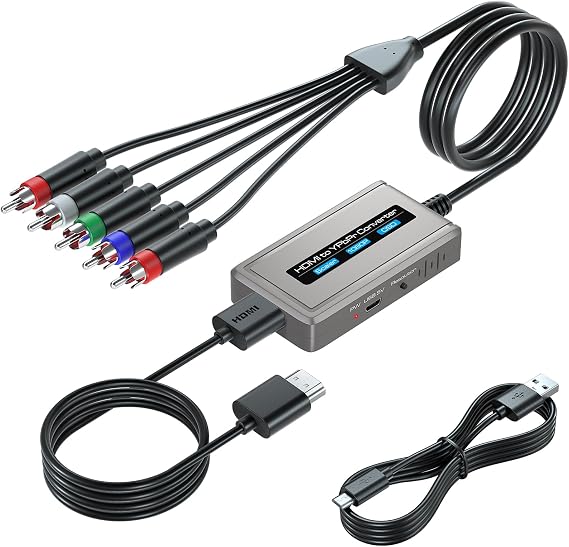
HDMI to Component Converter with Scaler Function, 1080P HDMI to YPbPr Converter Supports 1080i HD Input
Item #:
91694729
NAD 976
Price Details
Excluding Shipping & Custom charges ( Shipping and custom charges will be calculated on checkout )
*All items will import from US
0 ratings
Write a review
In stock
 Imported from USA store
QTY:
Order now and get it around Thursday, August 13
Secured transaction
Ubuy works hard to protect your security and privacy. Our advanced payment security system ensures confidentiality by encrypting your information during transmission using AES (Advanced Encryption Standards) and SSL (Secure Socket Layer) protocols. Your payment details are 100% secure as we do not share your payment details with third party sellers.
Our Top Logistics Partners


Enjoy high definition video and audio on traditional Component televisions with built-in scaler engine for seamless resolution adjustments.

Fast
Shipping

Free
Return*

Secure Packaging

100% Original Products

PCI DSS Compliance

ISO 27001 Certified


Note: Step Down Voltage Transformer required for using electronics products of US store (110-120). Recommended power converters Buy Now.


What Stands Out
High-Quality Scaling
This converter features a built-in scaler that ensures sharp and clear video output at 1080p, enhancing your viewing experience by providing high-definition visuals from HDMI sources.
Wide Compatibility
Supports a variety of HDMI input sources and outputs in YPbPr format, making it perfect for connecting modern devices to older display systems without compromising quality.
User-Friendly Design
Designed for easy setup, this converter is plug-and-play, requiring no additional software or configuration, enabling users to connect their devices seamlessly and enjoy hassle-free functionality.
Product Details
| Compatible Devices | Television |
| Specific Uses For Product | Projector |
| Connector Type | Component |
| Number of Ports | 2 |
| Power Plug Type | Type A - 2 pin (North American) |
| Smart Home Compatibility | Not Smart Home Compatible |
| Color | Grey |
| Finish | Hdmi |
| Package Quantity | 1 |
| Unit Count | 1.0 Count |
| Number of Items | 1 |
| Brand | Bcrokory |
| Model Number | e1e587fe-f953-401d-9ebe-d02e98079a01 |
| Manufacturer | Bcrokory |
| Mfr Part Number | e1e587fe-f953-401d-9ebe-d02e98079a01 |
| Item Weight | 1 lbs (450 grams) |
Who Should Buy?

-
HDMI Device Users
Ideal for users wanting to connect HDMI devices to older TVs that only support component inputs for video playback.
-
Home Theater Enthusiasts
Great for home theater setups that require scaling capabilities to convert HDMI to the YPbPr component format effectively.
-
Gamers
Perfect for gamers using older displays, wanting to maintain high video quality through 1080P scaling from HDMI sources.

-
4K Users
Not suitable for users seeking 4K resolution, as this converter only supports up to 1080P video output.
Product Description
HDMI to Component Converter with Scaler Function, 1080P HDMI to YPbPr Converter Supports 1080i HD Input
Have any Query? Chat with us
Customer Questions & Answers
-
Question:
What is an HDMI to Component Converter with Scaler Function?
Answer: An HDMI to Component Converter with Scaler Function is a device that transforms an HDMI signal into a YPbPr (Component) output. This allows HDMI-equipped devices, like Blu-ray players or gaming consoles, to connect to older TVs or devices that only have Component inputs. The scaler function enhances the resolution of the incoming HDMI signal to ensure the best possible output quality, typically up to 1080p. This is particularly useful for preserving image quality when connecting modern devices to legacy equipment. -
Question:
What video resolutions does this converter support?
Answer: This converter supports video resolutions up to 1080p, including 1080i. This means it can handle high-definition video signals, making it perfect for watching movies or playing games on older televisions that do not have HDMI inputs. The ability to convert various HDMI resolutions into compatible Component formats ensures that your viewing experience is optimized, delivering crisp visuals. Whether you're streaming content or playing video games, this device preserves the quality of your high-definition sources. -
Question:
Can this converter be used for gaming consoles?
Answer: Yes, this HDMI to Component Converter is ideal for gaming consoles. If you have a console that outputs HDMI and an older TV that only has Component input, this converter allows you to connect them seamlessly. You’ll enjoy high-definition gaming without sacrificing image quality, as the scaler function ensures that the resolution is adjusted appropriately for your display. Whether playing online games or enjoying single-player adventures, this setup keeps your gaming experience smooth and vibrant. -
Question:
Is audio supported with this HDMI to Component Converter?
Answer: The HDMI to Component Converter focuses on video output and typically does not support direct audio transmission through the Component connection. However, the HDMI input can carry audio, and you may need to utilize an additional method for audio output, such as connecting an external speaker system directly to the HDMI source or using an HDMI audio extractor. This ensures you still get high-quality sound alongside the HD visuals on your display. -
Question:
How do I connect the converter to my devices?
Answer: Connecting your HDMI to Component Converter is straightforward. Begin by linking your HDMI source device (e.g., Blu-ray player, gaming console) to the HDMI input of the converter using a standard HDMI cable. Next, connect the Component outputs (YPbPr) of the converter to your TV with appropriate Component cables. Finally, ensure all devices are powered on, select the correct input source on your TV, and you're ready to start enjoying your content. It’s a simple setup that brings modern devices to older displays. -
Question:
Does this converter require external power?
Answer: Yes, the HDMI to Component Converter typically requires an external power supply to operate. This is crucial for powering the internal scaler function, which ensures the signal is processed and output correctly. An included power adapter usually connects to a standard wall outlet, providing the necessary energy to convert and enhance the video signal from HDMI to Component. This powered setup guarantees optimal performance for your audio and visual experience. -
Question:
What types of devices can this converter work with?
Answer: This converter works with a wide array of HDMI-output devices, including DVD players, Blu-ray players, streaming devices, laptops, cameras, and gaming consoles. As long as the device outputs an HDMI signal, you can connect it to your Component-compatible TV or projector. This versatility makes it an essential tool for bridging the gap between new technology and older displays, ensuring that users can enjoy their favorite content on all types of screens. -
Question:
Are there any specific TV models compatible with this converter?
Answer: The HDMI to Component Converter is compatible with any television or projector that has Component inputs, commonly labeled as YPbPr. Most models made in the last couple of decades, particularly those with HD capabilities, can work well with this converter as long as they lack an HDMI port. This allows users of various brands and models to enjoy high-definition content from modern devices, making it an invaluable accessory for diverse setups. -
Question:
Can I use this converter for watching sports or live events?
Answer: Absolutely! The HDMI to Component Converter is perfect for watching sports or live events, especially since it supports 1080i HD input. You can connect your streaming device, such as a Roku or Apple TV, to your older TV and enjoy crisp, clear images during fast-paced action. With minimal delay thanks to optimized signal processing, this setup ensures you won't miss any critical moments during exciting matches or events. -
Question:
Where can I buy HDMI to Component Converter with Scaler Function in Namibia?
Answer: You can purchase the HDMI to Component Converter with Scaler Function from Ubuy in Namibia. Ubuy offers a seamless shopping experience, providing access to a wide range of electronic devices and converters, including this one. Whether you're upgrading your home entertainment system or need a reliable solution to connect modern HDMI devices to older displays, Ubuy is a great choice for your purchase.
Bcrokory Video Converters e1e587fe-f953-401d-9ebe-d02e98079a01 Editorial Review
The HDMI to Component Converter with Scaler Function has garnered a positive reception among users, particularly those aiming to bridge the gap between modern HDMI output devices and older CRT televisions. Customers have expressed satisfaction with its ability to convert 1080p HDMI signals to 1080i output, making it an ideal solution for retro gaming enthusiasts and those with vintage home theater setups. Users noted that the device works well out of the box, with straightforward plug-and-play functionality, although some tweaking of resolution settings may be necessary. The overall quality of the picture and sound delivered by the converter has been praised, although users have reported minor issues such as slight color gradient roughness and occasional artifacting, particularly with darker images. While hard-core gamers might notice some bleeding or lag, most users find that the quality exceeds expectations relative to its price. The build quality of the device is deemed robust, which gives users confidence in its longevity. Additionally, users have highlighted that the unit can handle a range of modern devices, including game Consoles and streaming services, effectively allowing for classic video playback on older displays. However, it’s important to note that while the device performs well, it does not automatically crop widescreen formats to 4:3, which could result in some loss of image on older TVs that don’t accommodate such adjustments. In terms of power supply, the lack of a dedicated power adapter has been mentioned, as the converter requires a standard USB power supply. Despite this, the device has fulfilled the needs of many users looking to enhance their viewing experience on legacy televisions, making it a solid recommendation for those in similar situations. **
Customer Reviews & Ratings
1 customers ratings
-
5 Star
100%
-
4 Star
0%
-
3 Star
0%
-
2 Star
0%
-
1 Star
0%
Review this product
Share your thoughts with other customers
Pros
- Excellent picture and sound quality for retro gaming and streaming.
- Simple plug-and-play setup.
- Good build quality.
- Capable of converting modern HDMI signals to 1080i for older TVs.
- Performs well with a variety of modern devices.
Cons
- Does not crop 16:9 content to 4:3 properly, potentially resulting in image loss.
Platform Trust & Buyer Confidence

MA
Mohammad
Verified buyer
“Excellent quality and original too,when ubuy send original things I will appreciate that ,I very satisfied thank you”
23 July 2026 · via Trustpilot
CK
Chitra
Verified buyer
“The order and delivery progress was communicated very well. Package arrived within the estimated time. Products arrived as expected in good condition.”
22-Jul-26 · via Trustpilot
K
kund
Verified buyer
“Good supply of products. Safe payment methods, and shipment worldwide! Genuine products.”
23-Jul-26 · via Trustpilot
OO
Onesi
Verified buyer
“Was my first time buying a product from Ubuy, but I found it so helpful. This is reliable. Gonna place a new order!”
22 July 2026 · via Trustpilot
SJ
SAO JOHN
Verified buyer
“Ubuy is a great online platform to buy stuff. Reliable, fast delivery time and great value for money. I've been using Ubuy online shopping platform for three years now and will continue to do so.”
23 July 2026 · via Trustpilot
Secure Checkout
Global Delivery
Easy Returns
Genuine Products
Product Price History
Important information
- Limitations : For products shipped internationally, please note that any manufacturer warranty may not be valid; manufacturer service options may not be available; product manuals, instructions, and safety warnings may not be in destination country languages; the products (and accompanying materials) may not be designed in accordance with destination country standards, specifications, and labeling requirements; and the products may not conform to destination country voltage and other electrical standards (requiring use of an adapter or converter if appropriate). The recipient is responsible for assuring that the product can be lawfully imported to the destination country. When ordering from Ubuy or its affiliates, the recipient is the importer of record and must comply with all laws and regulations of the destination country.
- Not all the products listed on Ubuy are for sale, as Ubuy is a global search engine. Products are subject to export/trade regulations.
NAD 976
Order now and get it around Thursday, August 13
This item is not restrict in my country.(Please click on above link if this item is not restrict in your country, So our team will review and allow.)
QTY:
Secured transaction
PCI DSS compliant and ISO 27001:2022 certified, with encrypted payments and full buyer protection on every order.
Our Top Logistics Partners
Fastest cross-border delivery
Features & Benefits
- Converts HDMI signals to Component video and analog stereo audio.
- Built-in scaler engine allows easy up-scaling or down-scaling of resolutions.
- Supports resolutions up to Full HD 1080p.
- Includes HDMI and Component cables, no need for extra purchases.
- OSD feature displays current input and output resolutions.
- Plug and play design for easy installation and operation.
Ubuy Assurance
Experience worry-free shopping with 100% original products, PCI DSS-compliant payment security, ISO 27001-certified data protection, the fastest cross-border delivery, free returns *, and secure packaging on every order.