0 ratings




Item #:
223803603
HP LaserJet Pro MFP M428fdn Monochrome All-in-One Printer with Built-in Ethernet & 2-Sided Printing, (W1A29A)
89% of respondents would recommend this to a friend
Item #:
223803603
NAD 18174
Price Details
Excluding Shipping & Custom charges ( Shipping and custom charges will be calculated on checkout )
*All items will import from US
0 ratings
Write a review
In stock
 Imported from USA store
QTY:
Order now and get it around Saturday, July 04
Secured transaction
Ubuy works hard to protect your security and privacy. Our advanced payment security system ensures confidentiality by encrypting your information during transmission using AES (Advanced Encryption Standards) and SSL (Secure Socket Layer) protocols. Your payment details are 100% secure as we do not share your payment details with third party sellers.
Our Top Logistics Partners


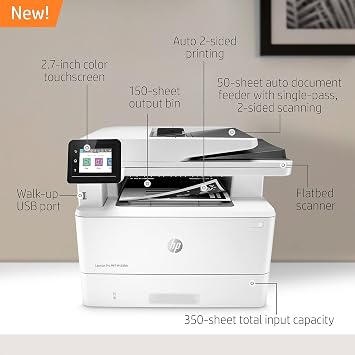
BUILT TO KEEP YOUR BUSINESS MOVING FORWARD – Print, scan, copy and fax consistently high-quality documents with the HP LaserJet Pro Multifunction M428fdn, a monochrome laser printer designed to let you focus on growing your business

Fast
Shipping

Free
Return*

Secure Packaging

100% Original Products

PCI DSS Compliance

ISO 27001 Certified


Note: Step Down Voltage Transformer required for using electronics products of US store (110-120). Recommended power converters Buy Now.


What Stands Out
All-in-One Functionality
Combines printing, scanning, copying, and faxing in one device, streamlining office tasks and saving space, ideal for small to medium businesses.
High-Speed Printing
Delivers fast monochrome printing up to 40 pages per minute, enhancing productivity and ensuring quick results for your business needs.
Built-in Ethernet
Enables easy network connectivity for multiple users and devices, facilitating collaborative work environments while maintaining reliable and secure printing access.
Product Details
- BUILT TO KEEP YOUR BUSINESS MOVING FORWARD – Print, scan, copy and fax consistently high-quality documents with the HP LaserJet Pro Multifunction M428fdn, a monochrome laser printer designed to let you focus on growing your business
- HP WOLF PRO SECURITY – Protect company data and safeguard against cyberattacks with protection built into the printer hardware, firmware and OS
- AUTOMATE COMPLICATED WORKFLOWS - Help save time by automating steps in a complicated workflow, and apply your saved settings at a touch of a button via the customizable control panel
- WALK-UP USB PRINTING – Print Microsoft Office-formatted files in addition to PDFs right off your USB drive, using a port on the front of the printer, and save paper with automatic 2-sided printing.Operating temperature range:50 to 90.5°F
- SPEED THROUGH TASKS – Stay productive with single-pass, 2-sided scanning, 50-sheet auto document feeder, 250-sheet input tray, and print speeds of up to 40 pages a minute from this multifunction laser printer.Power consumption:510 watts (active printing)
- ENHANCED ENERGY EFFICIENCY – Designed with the environment in mind, HP LaserJet Pro MFP M428fdn saves up to 22% energy over prior products, with technologies that help reduce paper waste
- TONER CARTRIDGES YOU CAN TRUST – Avoid reprints, wasted supplies, and service calls by using Original HP 58A/58X toner cartridges designed for your multifunction laser printer
- ONE-YEAR LIMITED HARDWARE – Get help with 24-hour, 7 days a week HP Web support. See specification sheet for terms and conditions.Power consumption:510 watts (active printing)
- This printer is intended to work only with cartridges with original HP chips or circuitry and will block cartridges using non-HP chips or circuitry. Periodic firmware updates will maintain the effectiveness of these measures.
| Printer Type | Laser |
| Other Special Features of the Product | 2.7-Inch Color Touchscreen with Customizable Shortcuts, 550-Sheet Optional Paper Tray, Auto-Duplex, Compact Design, Easy Cartridge Replacement, Fast First Page Out, HP Auto-On/Auto-Off Technology, HP EcoSmart Black Toner, Network-Ready, Simple Out-of-Box Setup (7 x 0 x 0 cm) |
| Printer Output Type | Monochrome |
| Item Weight | 27.8 Pounds (12.61 kg) |
| Item Dimensions D x W x H | 12.72"D x 15.35"W x 16.54"H (32.3 x 39 x 42 cm) |
| Controller Type | Android, iOS |
| Print media | Card stock, Envelopes, Glossy photo paper, High-resolution paper, Labels, Paper (plain) |
| Scanner Type | Sheetfed |
| Maximum Copy Speed Black and White | 38 ppm |
| Compatible Devices | Laptops, PC |
| EU Spare Part Availability Duration | 1 Years |
| Ink Color | black |
| Additional Printer Functions | All In One |
| Control Method | Touch |
| Compatible Cartridge | Original HP cartridges with compatible chips |
| Number of Trays | 1 |
| Resolution | 1200 x 1200 |
| Display Type | OLED |
| Color | White |
| Maximum Print Resolution Black and White | 1200 dots_per_inch (3048 cm) |
| Printer Connectivity Type | Ethernet, USB |
| Hardware Interface | USB 2.0 |
| Total USB 2.0 Ports | 1 |
| Total Usb Ports | 1 |
| Maximum Copy Resolution Black and White | 600 dpi |
| Brand | HP |
| Model Name | Old Version: M428fdn |
| Model Number | M428fdn |
| Built-In Media | Getting started guide, HP LaserJet Pro M428fdn, Phone cord, Power Cord, Preinstalled HP Black LaserJet Toner Cartridge (58A for AMS, yield ~3,000 pages), Regulatory flyer, Support flyer, Warranty guide |
| Model Series | LaserJet Pro |
| Specific Uses For Product | business |
| UPC | 192018914940 192018914971 192018914889 192018914933 192018914964 192018914896 192018914926 192018914957 192018914919 192018914902 |
| Global Trade Identification Number | 00192018914889 |
| Manufacturer | HP |
| Item Type Name | Multifunction Printer |
| Unit Count | 1.0 Count |
| B&W Pages per Minute | 40 ppm |
| Maximum Media Size | 8.5 x 14 inch (21.6 cm) |
| Maximum Sheet Capacity | 900 |
| Paper Size | 3 x 5 to 8.5 x 14, Letter, Legal, Envelope |
| Output sheet capacity | 150 |
| Power Consumption | 510 Watts |
| Wattage | 510 watts |
| Dual-sided printing | Yes |
| Duplex | Automatic |
| Connectivity Technology | Ethernet, USB |
| Printing Technology | Laser |
| Special Feature | 2.7-Inch Color Touchscreen with Customizable Shortcuts, 550-Sheet Optional Paper Tray, Auto-Duplex, Compact Design, Easy Cartridge Replacement, Fast First Page Out, HP Auto-On/Auto-Off Technology, HP EcoSmart Black Toner, Network-Ready, Simple Out-of-Box Setup See more (7 x 0 x 0 cm) |
| Printer Output | Monochrome |
| Max Printspeed Monochrome | 40 ppm |
| Product Dimensions (L x W x H) | 12.72"D x 15.35"W x 16.54"H (32.3 x 39 x 42 cm) |
What's in the box
HP LaserJet Pro M428fdn
Preinstalled HP Black LaserJet Toner Cartridge (58A for AMS, yield ~3,000 pages)
Getting started guide
Support flyer
Warranty guide
Regulatory flyer
Power Cord
Phone cord
Who Should Buy?

-
Small Businesses
Ideal for small businesses needing efficient printing, scanning, and copying capabilities in a compact device.
-
Remote Work
Perfect for remote workers requiring reliable monochrome printing and two-sided functionality for reports and documents.
-
Cost-Conscious Users
Best suited for users looking for affordable, high-quality black-and-white printing to reduce expenses on ink.

-
Heavy Color Users
Not suitable for those requiring vibrant color printing, as it only prints in monochrome.
-
Home Users
Less ideal for casual home users who need compact, versatile devices for various printing tasks beyond monochrome.
-
Occasional Users
Not recommended for users with sporadic printing needs, as the printer’s capabilities may exceed simple requirements.
Product Description
Have any Query? Chat with us
Related Searches
Customer Questions & Answers
-
Question:
What are the key features of the HP LaserJet Pro MFP M428fdn?
Answer: The HP LaserJet Pro MFP M428fdn is an all-in-one monochrome printer that offers print, scan, copy, and fax capabilities. It boasts a built-in Ethernet for network connectivity and supports automatic 2-sided printing, which saves paper and enhances productivity. The printer is designed for high-volume printing, providing fast print speeds of up to 38 pages per minute and a first page out in as fast as 6.3 seconds. This makes it suitable for busy office environments where efficiency is crucial. -
Question:
How does the 2-sided printing feature work?
Answer: The 2-sided printing feature of the HP LaserJet Pro MFP M428fdn automatically prints on both sides of the paper, reducing the amount of paper used and helping the environment. It uses a single-pass duplex mechanism that efficiently grabs both sides in one pass, leading to faster printing. This feature is especially useful for printing documents like reports and presentations, where multiple pages are required, ultimately streamlining your printing process and reducing costs. -
Question:
Can I connect the printer wirelessly?
Answer: The HP LaserJet Pro MFP M428fdn primarily supports Ethernet connectivity; however, it also offers wireless printing capabilities through the HP Smart app. You can connect to your printer via Wi-Fi, making it easier to print from multiple devices without direct cable connections. This is an excellent option for users with various devices such as laptops, tablets, and smartphones, enabling seamless printing from anywhere within your home or office. -
Question:
What types of media can I print on with this printer?
Answer: The HP LaserJet Pro MFP M428fdn is versatile in terms of media handling. It can print on a variety of media types including plain paper, envelopes, labels, and heavy media. The printer accommodates different paper sizes ranging from A4 to legal size, allowing for flexibility in printing standard documents or specialized materials. This flexibility caters to various business needs, whether you’re producing flyers, brochures, or everyday documents. -
Question:
Is this printer compatible with my operating system?
Answer: Yes, the HP LaserJet Pro MFP M428fdn is compatible with a wide range of operating systems, including Windows, Mac OS, and Linux. HP regularly updates printer drivers to ensure compatibility with the latest OS versions. This means you can seamlessly integrate the printer into your existing technology setup without the hassle of compatibility issues, making it a convenient choice for diverse office environments. -
Question:
What is the monthly duty cycle for this printer?
Answer: The HP LaserJet Pro MFP M428fdn has a recommended monthly page volume of 2,500 to 4,000 pages, with a maximum monthly duty cycle of up to 80,000 pages. This makes it an excellent choice for moderate to high-volume print environments like small to medium-sized businesses. By understanding the printer’s limits, users can ensure that they are using it efficiently, allowing for optimal performance without overloading the machine. -
Question:
How do I maintain the printer for optimal performance?
Answer: To ensure optimal performance of the HP LaserJet Pro MFP M428fdn, regular maintenance is key. This includes cleaning the printer’s interior, replacing toner cartridges as needed, and keeping the firmware updated. Additionally, you should regularly check for paper jams and ensure that you are using recommended paper types and sizes. This maintenance routine helps alleviate common printing issues, thereby increasing the longevity and reliability of the printer. -
Question:
What is the maximum print resolution?
Answer: The HP LaserJet Pro MFP M428fdn offers a maximum print resolution of 1200 x 1200 dpi. This high resolution ensures that text and graphics are printed with exceptional clarity and detail. Whether you are printing professional documents or high-quality images, the printer’s capability to deliver sharp outputs makes it a valuable tool in any office, enhancing the overall presentation of your printed materials. -
Question:
What is included in the box when I purchase this printer?
Answer: When you purchase the HP LaserJet Pro MFP M428fdn, the box includes the printer itself, power cords, an initial toner cartridge, a quick start guide, and installation CD. The initial toner cartridge is designed to yield up to 3,000 pages, allowing users to start printing right away. This comprehensive package helps users to easily set up their printer and begin using it effectively, right out of the box. -
Question:
Where can I buy the HP LaserJet Pro MFP M428fdn?
Answer: You can purchase the HP LaserJet Pro MFP M428fdn from Ubuy, a reliable online retailer that ships to the Namibia. Ubuy offers a range of products including printers, and you can find the HP LaserJet Pro MFP M428fdn easily by searching their platform. This is a great option for ensuring you get the product delivered directly to your doorstep conveniently.
HP Laser Printers M428fdn Editorial Review

** HP LaserJet Pro MFP M428fdn** The HP LaserJet Pro MFP M428fdn presents itself as a versatile all-in-one monochrome printer designed for both office and personal use. Customers highlight its ease of setup, especially when hardwired to a network, and its performance in terms of speed and quality of prints. Users transitioning from older inkjet models appreciate the M428fdn's quicker print speeds and higher print resolutions, which align closely with their needs, making it a competitive option for tasks like printing documents and scanning. While the printer excels in most functional aspects, some users have noted concerns regarding print quality, particularly when operating in toner-saving modes, which can produce slightly 'light' prints. Many also find the scanner function effective, though it tends to be slower compared to professional-grade options. The elimination of bulky equipment such as standalone scanners is a welcome upgrade for those with space Constraints. Compatibility emerges as a mixed bag—the ability to scan directly to a network folder is a touted feature; however, several users report challenges, particularly concerning Network Attached Storage (NAS) devices, which the M428fdn seems to struggle with. This limitation necessitates additional steps for transferring scanned documents, leading to inefficiencies in workflows. Furthermore, feedback regarding the device’s small touch display suggests that it may not be user-friendly for everyone, particularly individuals with larger fingers or reduced dexterity. Cost-effectiveness comes into play with the printer's toner cartridges, as the large-capacity options can yield thousands of pages at a low cost per page. However, concerns about HP potentially limiting third-party cartridge usage raise questions regarding ongoing expenses. Unfortunately, the customer service aspect leaves much to be desired, with mixed reports about the knowledge and helpfulness of support staff. In summary, the HP LaserJet Pro MFP M428fdn offers solid performance and functionality for those in need of a reliable monochrome printing and scanning solution, but potential users should be mindful of its limitations concerning compatibility and support. **
Customer Reviews & Ratings
299 customers ratings
-
5 Star
65%
-
4 Star
16%
-
3 Star
8%
-
2 Star
3%
-
1 Star
8%
Review this product
Share your thoughts with other customers
Pros
- Fast printing speeds with high DPI.
- Versatile functionality (printing, scanning, faxing).
- Cost-effective printing with high-capacity toner options.
- Simple setup for network connectivity.
Cons
- Print quality may be light in eco modes.
Top selling HP LaserJet Pro MFP in Ghana





Last Updated on June 17, 2026
Product Price History
Important information
- Limitations : For products shipped internationally, please note that any manufacturer warranty may not be valid; manufacturer service options may not be available; product manuals, instructions, and safety warnings may not be in destination country languages; the products (and accompanying materials) may not be designed in accordance with destination country standards, specifications, and labeling requirements; and the products may not conform to destination country voltage and other electrical standards (requiring use of an adapter or converter if appropriate). The recipient is responsible for assuring that the product can be lawfully imported to the destination country. When ordering from Ubuy or its affiliates, the recipient is the importer of record and must comply with all laws and regulations of the destination country.
- Not all the products listed on Ubuy are for sale, as Ubuy is a global search engine. Products are subject to export/trade regulations.
NAD 18174
Order now and get it around Saturday, July 04
This item is not restrict in my country.(Please click on above link if this item is not restrict in your country, So our team will review and allow.)
QTY:
Secured transaction
Ubuy works hard to protect your security and privacy. Our advanced payment security system ensures confidentiality by encrypting your information during transmission using AES (Advanced Encryption Standards) and SSL (Secure Socket Layer) protocols. Your payment details are 100% secure as we do not share your payment details with third party sellers.
Our Top Logistics Partners
Fastest cross-border delivery
Features & Benefits
- Fast print, scan, copy, and fax capabilities
- Best-in-class security
- Automated workflows
- Intuitive touchscreen control panel
- Automatic 2-sided printing
- Save up to 22% over prior products with HP Eco Smart black Toner